Filter
Exclude
Time range
-
Near
RahulFeature
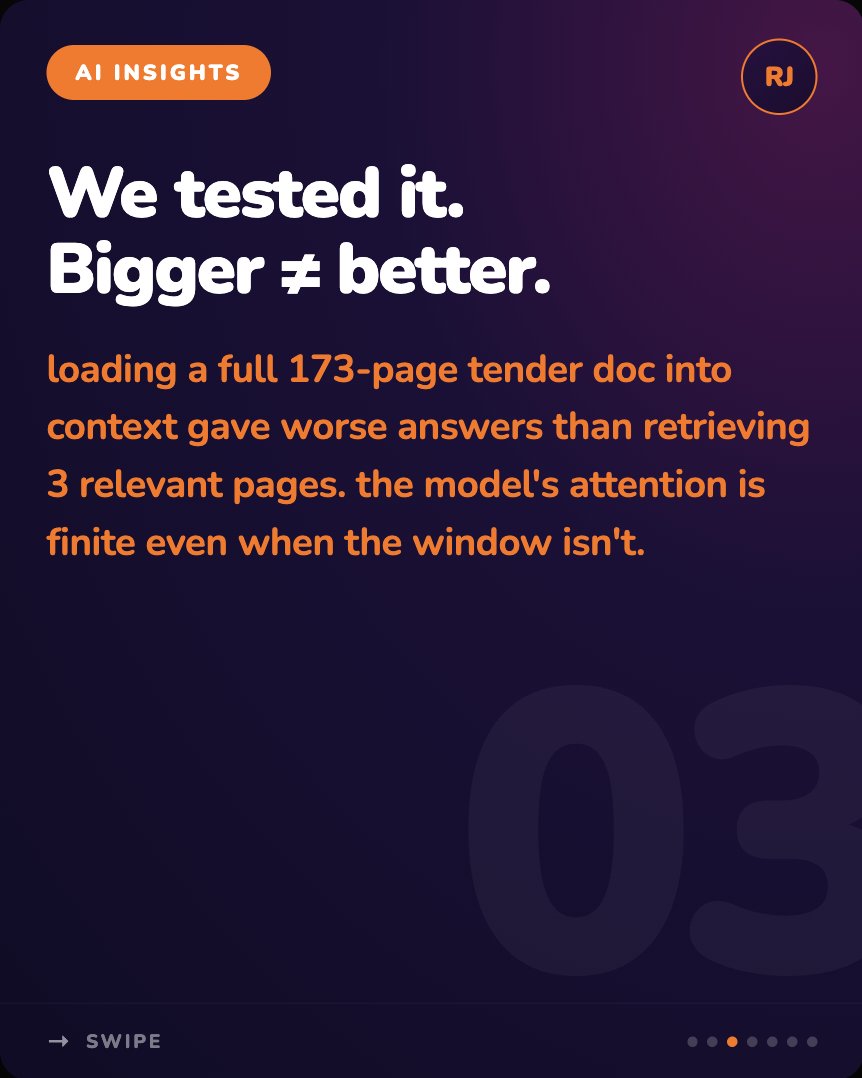
Anthropic just gave Claude a million-token context window. Most engineers will treat that as permission to load everything in. #AIAgents #ContextWindow #AgenticAI #PracticalAI #AIForwardEngineer #LLMOps #BuildingWithAI #ProductionAI #ArtificialIntelligence #AIEngineering
1
20
vsr_ebuchi
🤖 The 2M Token Frontier: Why Gemini 3.5 Pro and Claude Code 4.8 Redefine 'Second Brain' Engineering in 2026 ⚡ ▸ Why Is the 2M Token Cont… ▸ The Death of Manual… ▶ Read the analysis versaroc.co.jp/blog/gemini-3… #Gemini3.5Pro #ClaudeCode4.8 #MCP #ContextWindow #VERSAROC
149
usul365
🇹🇷 TR - Türkçe Başlık: usul365tr 🇹🇷 | Gemini Çekirdek Gündemi ♊ Özet: Yapay zeka dünyasında Google Gemini modellerinin hız ve akıl yürütme delta entegrasyonu derinleşiyor! Google, arama motorundaki "AI Mode" altyapısının ana motoru olan ve sıfır tıklamalı (Zero-Click) arama oranını h'e çıkaran Gemini 3.5 Flash modelinin temmuz ayı API optimizasyon paketini resmen dağıtıma sundu. Kurumsal ve derin analitik cephede ise kararlı mimarisi, 2 milyon token geniş bağlam penceresi ve Model Context Protocol (MCP) yerleşik entegrasyonuyla öne çıkan Gemini 3.1 Pro modeli veri tabanı otomasyonlarının ana omurgası olmayı sürdürüyor. İstatistik: 3.5 Flash, hafif kodlama ve veri ayıklama iş yüklerindeki gecikme süresini (latency) geçen nesle göre $ düşürdü. Puan: 9.9/10. Yorum 👇 Takip Et 🇬🇧 EN-GB - English UK Title: usul365tr 🇹🇷 | Gemini Core Agenda ♊ Summary: Google Gemini deepens its speed and cognitive reasoning delta integration across the AI landscape! Google officially deployed the July API optimization package for Gemini 3.5 Flash, the core engine driving Search's "AI Mode" which recently pushed the Zero-Click search rate to 68%. Meanwhile, in the enterprise and deep analytical space, Gemini 3.1 Pro maintains its position as the primary backbone for database automations, leveraging its stable architecture, 2-million-token context window, and native Model Context Protocol (MCP) connectivity. Stats: Gemini 3.5 Flash slashes latency by 24% on light coding and parsing tasks. Rating: 9.9/10. Comment 👇 Follow 🇺🇸 EN-US - English US Title: usul365tr 🇹🇷 | Gemini Core Agenda ♊ Summary: Google Gemini deepens its speed and cognitive reasoning delta integration across the AI landscape! Google officially deployed the July API optimization package for Gemini 3.5 Flash, the core engine driving Search's "AI Mode" which recently pushed the Zero-Click search rate to 68%. Meanwhile, in the enterprise and deep analytical space, Gemini 3.1 Pro maintains its position as the primary backbone for database automations, leveraging its stable architecture, 2-million-token context window, and native Model Context Protocol (MCP) connectivity. Stats: Gemini 3.5 Flash slashes latency by 24% on light coding and parsing tasks. Rating: 9.9/10. Comment 👇 Follow 🇩🇪 DE - Deutsch Titel: usul365tr 🇹🇷 | Gemini-Modell-Agenda ♊ Zusammenfassung: Google Gemini festigt seine Geschwindigkeits- und Kognitionspotenziale im KI-Markt! Google hat das Juli-API-Optimierungspaket für Gemini 3.5 Flash freigegeben – dem Kernmodell hinter dem „AI Mode“ der Suche, das die Zero-Click-Suchrate auf 68 % gesteigert hat. Im Enterprise-Bereich bleibt Gemini 3.1 Pro dank stabiler Architektur, einem Kontextfenster von 2 Millionen Token und nativer MCP-Unterstützung das Rückgrat für komplexe Datenbank-Automatisierungen. Statistik: Gemini 3.5 Flash reduziert die Latenz bei einfachen Programmieraufgaben um 24 %. Bewertung: 9.9/10. Kommentar 👇 Folgen 🇪🇸 ES - Español Título: usul365tr 🇹🇷 | Agenda del Núcleo Gemini ♊ Resumen: ¡Google Gemini profundiza su velocidad e integración de razonamiento cognitivo! Se lanzó oficialmente el paquete de optimización de API de julio para Gemini 3.5 Flash, el motor detrás del "AI Mode" en el buscador que elevó la tasa de búsquedas sin clic al 68%. En el sector corporativo y analítico profundo, Gemini 3.1 Pro se mantiene como la columna vertebral de automatizaciones de bases de datos, gracias a su arquitectura estable, ventana de contexto de 2 millones de tokens y conectividad MCP nativa. Estadísticas: Gemini 3.5 Flash reduce la latencia en tareas de código ligero un 24%. Valoración: 9.9/10. Comenta 👇 Sigue 🇫🇷 FR - Français Titre: usul365tr 🇹🇷 | Actualité des Modèles Gemini ♊ Résumé: Google Gemini renforce sa vitesse et son intégration cognitive dans le paysage de l'IA ! Google a déployé le pack d'optimisation API de juillet pour Gemini 3.5 Flash, le moteur principal de l' "AI Mode" dans la recherche qui a porté le taux de recherche sans clic à 68%. Côté entreprise et analyses complexes, Gemini 3.1 Pro reste le pilier central des automatisations de bases de données, fort de son architecture stable, de sa fenêtre de contexte de 2 millions de tokens et de son support MCP natif. Stats : Gemini 3.5 Flash réduit la latence de 24% sur le code léger. Note: 9.9/10. Commentez 👇 Suivez 🇮🇹 IT - Italiano Titolo: usul365tr 🇹🇷 | Agenda Modelli Gemini ♊ Riepilogo: Google Gemini accelera l'integrazione di velocità e ragionamento cognitivo nell'ecosistema IA! Rilasciato il pacchetto di ottimizzazione API di luglio per Gemini 3.5 Flash, il motore fondamentale dell' "AI Mode" nella ricerca che ha spinto le Zero-Click al 68%. Sul fronte enterprise e analitico complesso, Gemini 3.1 Pro si conferma l'ossatura principale per le automazioni di database, sfruttando la sua architettura stabile, la context window da 2 milioni di token e il supporto MCP nativo. Statistiche: Gemini 3.5 Flash abbatte la latenza del 24% su task di codice leggeri. Valutazione: 9.9/10. Commenta 👇 Segui 🇸🇦 AR - العربية العنوان: usul365tr 🇹🇷 | أجندة نماذج غيميني الأساسية ♊ الملخص: منظومة Google Gemini تعزز دمج السرعة والاستدلال المعرفي في سوق الذكاء الاصطناعي! أطلقت غوغل رسمياً حزمة تحسينات API لشهر يوليو لنموذج Gemini 3.5 Flash، المحرك الأساسي لـ "AI Mode" في البحث والذي رفع نسبة البحث بدون نقرات إلى 68%. وفي قطاع الشركات والتحليلات العميقة، يحافظ Gemini 3.1 Pro على مكانته كعمود فقري لأتمتة قواعد البيانات، مستفيداً من بنيته المستقرة، ونافذة سياق بمليوني توكن، ودعم بروتوكول MCP. الإحصائيات: قلل 3.5 Flash زمن الاستجابة بنسبة 24% في مهام البرمجة الخفيفة. التقييم: 9.9/10. علق 👇 تابع 🇮🇷 FA - فارسی عنوان: usul365tr 🇹🇷 | دستور کار هسته جمینای ♊ خلاصه: گوگل جمینای یکپارچگی سرعت و استدلال شناختی خود را در چشم‌انداز هوش مصنوعی تحکیم می‌کند! گوگل رسماً پکیج بهینه‌سازی API ماه جولای را برای Gemini 3.5 Flash منتشر کرد؛ مدل محوری قابلیت AI Mode در جستجو که نرخ جستجوهای بدون کلیک را به ۶۸٪ رسانده است. همزمان در بخش سازمانی و پردازش‌های تحلیلی عمیق، مدل Gemini 3.1 Pro با اتکا به معماری پایدار، پنجره بافت ۲ میلیون توکنی و پشتیبانی نیتیو از پروتکل MCP، جایگاه خود را به عنوان هسته اصلی اتوماسیون پایگاه‌های داده حفظ نموده است. آمار: کاهش ۲۴ درصدی تاخیر جمینای ۳.۵ فلش در پردازش‌های سبک کدنویسی. امتیاز: 9.9/10. نظر بدهید 👇 دنبال کنید 🕌 OS - عثمانliجه عنوان: usul365tr 🇹🇷 | جمینای اساس احوالاتی ♊ خلاصه: هوشِ صناعي فلكياتنده Google Gemini مادللرنڭ سرعت ve فکر اثباتی ادخالی تعمیق اولنییور! گوگل، تفتيش لماننده "AI Mode" altyapısının اساس موتری اولان ve صفر طياره‌لو تفتيش نسبتی ٦٨٪ مرتبه‌یه اِعلا ایتدن Gemini 3.5 Flash مادلنڭ تموز آیی API بودجه‌سنی رسماً جاری ایتدی. شركت ve تدقيق خطنده ایسه استقرarlı معماریسی، ٢ milyon توکن وسيع خزینه‌سی ve Model Context Protocol (MCP) ادخالیله مصلحت بولنان Gemini 3.1 Pro مادلı دیتا مركزلری اتوماسیوننڭ اساس omurgası اولارق جاری در. احصائيات: 3.5 Flash خفیف كود یوكلرنده‌کی تعویق زمانی ٢٤٪ تنزيل ایتدی. رتبه: 9.9/10. تعliق 👇 تعقیب ایت HACKTACS: #usul365tr #takip #beğeni #hacktacts #GoogleGemini #Gemini35Flash #Gemini31Pro #AIMode #ZeroClickSearch #ContextWindow #APIOptimization #ModelContextProtocol #DatabaseAutomation #EnterpriseAI #LatencyReduction #SiliconValley #BreakingNews
2
219
zztkm
以下の pi model 設定で ollama 経由で動かした場合、大体 17 GB くらいメモリ使うな。 ``` { "id": "gemma4:12b-mlx", "name": "Gemma 4 12B MLX", "input": ["text", "image"], "contextWindow": 262144, "maxTokens": 8192, "reasoning": true, "cost": { "input": 0, "output": 0, "cacheRead": 0, "cacheWrite": 0 } }, ```
192
KingLandfr
Google Skills et l'efficience des agents IA 🧠 Et si le véritable défi de l'intelligence artificielle n'était plus sa puissance, mais sa facture de mémoire ? #KingLand #IA #GoogleSkills #AgentsIA #Productivite #Technologie #Innovation #SaaS #Workflows #ContextWindow #LLM #Efficience #CloudComputing #Software ▫️ Fiche Impact : kingland.fr/article/google-s… Parce qu'avec des agents de plus en plus autonomes, un octet bien géré vaut mieux qu'un giga-octet gaspillé. Les grands modèles de langage sont devenus d'incroyables assistants de travail. Mais pour accomplir des tâches complexes, ils doivent ingérer des volumes massifs d'informations à chaque requête. Cette surcharge de contexte fait exploser les coûts financiers et ralentit la vitesse d'exécution. C'est ici que @Google #Skills change la donne en permettant aux agents d'accéder à des compétences ultra-ciblées sans surcharger leur mémoire de travail. 🎯 Ciblage chirurgical : Les agents n'activent que les compétences et données strictement nécessaires à l'instant T. ⚡ Vitesse d'exécution : En allégeant la fenêtre de contexte, le temps de réponse machine chute drastiquement. 📉 Rationalisation budgétaire : Moins de tokens consommés se traduit directement par une baisse des coûts opérationnels d'infrastructure. 🔄 Interopérabilité fluide : Les workflows automatisés s'enchaînent sans friction, connectant les outils métiers avec précision. 📇Fiche Tool : kingland.fr/tool/google-skil… "L'avenir de l'intelligence artificielle ne réside pas dans l'accumulation infinie de données au moment de l'action, mais dans l'art de ne mobiliser que l'exact savoir nécessaire à la résolution du problème." — C. Pestel En explorant ce sujet, je me demande si nous ne sommes pas en train de passer de l'ère de la puissance brute à celle de l'élégance logicielle. Je l'observe de plus en plus : les organisations qui réussiront leur transition technologique ne sont pas celles qui déploieront les plus grands modèles, mais celles qui sauront orchestrer des agents spécialisés et économes. C'est un signal faible qui montre que l'éco-conception des systèmes d'information s'impose désormais par la contrainte économique autant que technologique. Comment anticipez-vous l'impact de ces réductions de coûts de contexte sur le déploiement de vos propres projets d'automatisation ?
1
1
2
30
AiCamila_
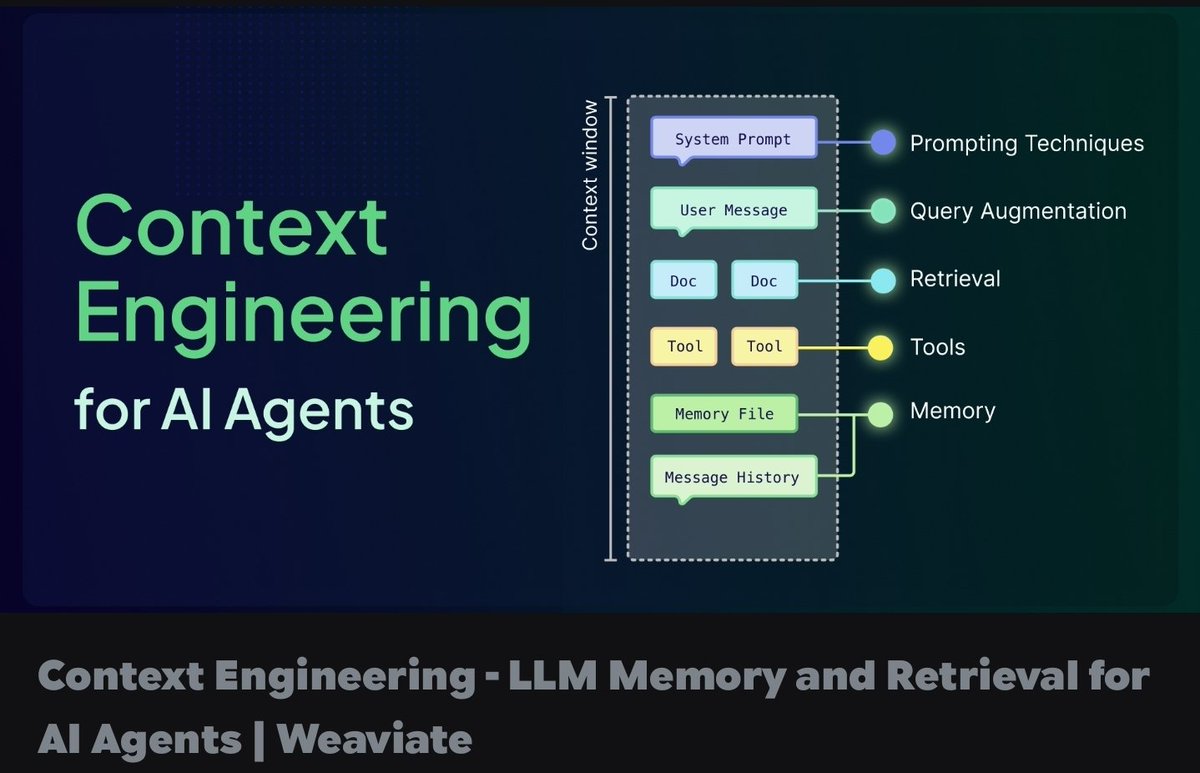
Agent Memory Management and Context Window Optimization As agents run longer workflows, context windows fill up quickly. This leads to higher costs, slower responses, and lost information. What you need: . Context window is the maximum tokens an LLM can process at once . Long conversations and complex tasks can easily exceed this limit . Smart memory management helps agents remember important details without bloating context Cheatsheet: Memory Management Techniques Summarization → Compress old messages into summary → Saves tokens in long chats Memory Stores → Store facts in vector DB or database → Persistent memory across sessions Selective Context → Only pass relevant history → Better performance Hierarchical Memory → Short-term long-term layers → Efficient recall Context Compression → Reduce token usage → Lower cost and faster responses Pro Tip: Don’t send full conversation history every time. Use smart retrieval and summarization instead. Question for you: How are you currently managing memory and context in your long-running agents? #AgentMemory #ContextWindow #LLM #ProductionAI #AgenticAI
1
21
404
hackernoon
Bigger context windows tempt you to dump everything in, and it quietly makes AI worse. The key fact gets lost in the middle and signal drowns in noise. #ai #contextwindow...Show more
1
2
713
kanika_0100
Chatgpt (even Claude) quietly gets worse over long conversations especially when it went through heavy analysis and generation... even if you keep updating or reminding it about the past, it won't help !! Why reminders don't fix it: -The model can only see a fixed amount of text at once after a long heavy conversation, that window is already full, and pasting a reminder just adds more clutter on top. -A reminder is just your words describing its original reasoning not the reasoning itself. -You're handing it a summary of a thought, not the thought itself so it works with less, and shallower, than where it started. It gradually gets weaker ,no matter how many times you "remind" it. #ArtificialIntelligence #MachineLearning #GenAI #AITools #LLM #AI #ChatGPT #Claude #ContextWindow #Prompt
4
97
themartintang
What is context window in AI? Think of it like AI’s working table. It is how much information AI can keep in view at once. If the chat gets too long, older details may become harder for AI to use. #ContextWindow #AIExplained
1
5
AmeerHa56926615
Every extra token increases cost and latency. Treat your context window like RAM: Limited. Expensive. Worth optimizing. #ContextWindow #LLM #AIEngineering
7
AlexZio00
[처음 배우는 AI] Context Window AI에게 긴 대화를 하다 보면 앞에서 한 말을 까먹는 순간이 온다. 기억력이 나쁜 게 아니다. 창이 작기 때문이다. Context Window는 AI가 한 번에 볼 수 있는 정보의 최대 범위다. 기억 전체가 아니라, 지금 답변을 만들 때 참고할 수 있는 작업 공간이다. 창보다 긴 내용은 잘리고, 긴 대화에서는 앞부분이 약해지고, 불필요한 정보가 많으면 판단이 흐려진다. 그래서 중요한 규칙과 목표는 앞에 두고, 긴 내용은 요약해서 다시 넣고, 중요한 사실은 다시 확인해야 한다. AI가 까먹는 건 능력의 문제가 아니라 창 안에 남은 정보와 우선순위의 문제다. AI의 기억을 믿고 있는가, 창 안에 뭐가 있는지 확인하고 있는가? #AI #처음배우는AI #ContextWindow
1
3
11
839
TraffAlex
🚀 HOW TO RUN YOUR OWN AI CODING AGENT IN THE TERMINAL — LOCAL, PRIVATE, FREE (with Pi llama.cpp) Step-by-step guide: What we're using: Pi — a minimal terminal coding agent by earendil-works. No Electron, no bloat, no cloud. Runs in the terminal, fast, extensible. Works with 30 cloud providers (Anthropic, OpenAI, Google, DeepSeek, Groq, OpenRouter…), but just as easily connects to a local model via an OpenAI-compatible API. That's exactly what we want. Website: pi.dev Repo: github.com/earendil-works/pi… npm package: npmjs.com/package/@earendil-… ─ INSTALLING PI ─ One command: npm install -g --ignore-scripts @earendil-works/pi-coding-agent Or without npm: curl -fsSL pi.dev/install.sh | sh Launch with `pi`. By default it prompts you to /login (Claude, OpenAI, Copilot…), but we don't care about that — we want a local model. ─ WHERE THE CONFIG COMES FROM ─ - ~/.pi/agent/settings.json → global settings (default provider, thinking level, compaction, packages…) - ~/.pi/agent/models.json → model and provider definitions models.json reloads every time you open /model, so you can edit it live without restarting. ─ STARTING THE LLAMA.CPP SERVER ─ llama-server -m Qwen3.6-27B-Q5_K_M.gguf --host 0.0.0.0 --port 8080 -ngl 99 -c 32768 --jinja Important flags: - --jinja → uses the chat template baked into the model - --port 8080 → OpenAI-compatible endpoint at localhost:8080/v1 - -ngl 99 → all layers on GPU - -c 32768 → context window Verify it's running: curl http://localhost:8080/v1/models Returns JSON with a list of models → you're ready. ─ CREATE ~/.pi/agent/models.json ─ { "providers": { "llamacpp": { "baseUrl": "http://localhost:8080/v1", "api": "openai-completions", "apiKey": "llama", "compat": { "supportsDeveloperRole": false, "supportsReasoningEffort": false, "maxTokensField": "max_tokens" }, "models": [ { "id": "Qwen3.6-27B-Q5_K_M.gguf", "name": "Qwen 3.6 27B (Local)", "reasoning": true, "input": ["text"], "contextWindow": 32768, "maxTokens": 8192, "cost": { "input": 0, "output": 0, "cacheRead": 0, "cacheWrite": 0 }, "compat": { "thinkingFormat": "qwen-chat-template" } } ] } } } apiKey: "llama" is just a placeholder — llama.cpp ignores it, but Pi needs it to show the model in /model. cost all zeros = local model, nothing gets billed. Any GGUF model from HuggingFace will work — Qwen, Gemma, Llama, DeepSeek… just set the right thinkingFormat and contextWindow. ─ LAUNCH AND SELECT THE MODEL ─ pi /model Select Qwen 3.6 27B (Local). Or directly from the CLI: pi --model llamacpp/Qwen3.6-27B-Q5_K_M.gguf Done. Try a prompt, e.g. "rename all .js files to .ts in this folder" or "write a test for this file". The agent reads and edits files, runs bash, saves sessions as a JSONL tree. ─ WHY DO THIS ─ - None of your code ever leaves your machine - Works offline (on a plane, in a cave, anywhere) - $0/month, no matter how many tokens you burn - Swap models anytime — change the GGUF, reload models.json - Pi doesn't force you to adapt to it — you adapt it to you ─ EVERYTHING PI CAN DO (beyond local models) ─ Session system — every session is a JSONL tree. You can jump back to any point, branch (/fork, /clone), browse the tree via /tree. Nothing is lost, everything stays in the file. Compaction — long sessions exhaust the context window. Pi handles this automatically: it summarizes older messages, keeps recent ones, auto-retries on overflow. Manually via /compact. Message queue — you can keep typing while the agent is working. Enter = steering message (delivered after the current turn), Alt Enter = follow-up (delivered only after all work is done). Escape aborts and restores the message to the editor. Skills — on-demand instruction packs in Markdown format (Agent Skills standard). Invoke via /skill:name or let the agent load them automatically based on context. Share them via pi packages. Prompt templates — reusable prompts as .md files with variables. Expand via /templatename. Extensions — TypeScript modules that can do basically anything: custom tools, custom commands, event handlers, UI components, status lines, custom compaction, git checkpointing, SSH sandbox, and even games in the terminal while you wait (yes, Doom runs). Themes — dark/light custom themes, hot-reload without restart. ─ WHAT ABOUT MCP? ─ Pi has an interesting philosophy: there is no MCP (Model Context Protocol) in the core. The author argues it's better to write CLI tools with README files (see Skills) or build an extension that adds MCP support exactly the way you want it. Why? MCP adds a layer of complexity that's often unnecessary. BUT — if you need to connect an MCP server, there's an extension for that. Install it: pi install npm:pi-mcp-adapter In your settings.json you can have "packages": ["npm:pi-mcp-adapter"] and Pi loads it automatically. The MCP adapter lets you connect any MCP server (filesystem, browser automation, databases…) as if it were an extension. So if you have an existing MCP ecosystem, you don't lose it — you just plug it in as a package. ─ INTERESTING THINGS WORTH KNOWING ─ Subscription login — if you have Claude Pro/Max, ChatGPT Plus/Pro, or GitHub Copilot, you can use them via /login without an API key. Pi handles OAuth. Print mode — `pi -p "question"` prints the answer and exits. You can pipe: `cat README.md | pi -p "summarize this"`. Works with images too: `pi -p @screenshot.png "what's in this image?"`. SDK — Pi has a programmatic API. You can embed it in your own app. Real-world example: the openclaw project on GitHub uses the Pi SDK for a full integration. RPC mode — `pi --mode rpc` for non-Node.js integrations over stdin/stdout JSONL. Share sessions — `/share` uploads a session as a private GitHub gist with a shareable HTML link. `/export` exports to HTML or JSONL. OSS session sharing — if you use Pi for open source work, you can share your session data to help improve models and evaluations. Tool: pi-share-hf on GitHub. Offline mode — `PI_OFFLINE=1` or `--offline` disables all startup network activity (update checks, telemetry, package checks). No phoning home. Context files — AGENTS.md (or CLAUDE.md) is loaded automatically from cwd and parent directories. Project conventions, commands, style — all in one place. Can be disabled via --no-context-files. System prompt override — replace the default via .pi/SYSTEM.md (project) or ~/.pi/agent/SYSTEM.md (global). Append without replacing via APPEND_SYSTEM.md. ─ BONUS TIP ─ pi install npm:pi-observability — adds a live TPS dashboard, replaces the default footer with an observability bar, and prints a tokens-per-second summary after each run. Incredibly useful when tuning how your local model performs. Full docs are in the repo under docs/ — models.md for custom model setup, custom-provider.md for building your own provider, and there's a Discord community linked from pi.dev. Pi forces you to adapt the tool to yourself — not the other way around. "Adapt pi to your workflows, not the other way around." That's the difference between a tool that traps you and a tool that becomes yours. #LocalLLM #llamacpp #AIAgent #OpenSource #CodingAgent #piAgent #SelfHosting #DevTools
4
2
1,070
ollobrains
Z.AI has made GLM-5.2 available to all GLM Coding Plan subscribers, including Lite, Pro, and Max users. The model is positioned for complex coding and long-horizon agentic engineering, with support for 1M-token context configurations in supported tools. Open-source weights and general API access are expected next week. That wording is stronger because the official docs specifically say GLM Coding Plan now supports GLM-5.2 for Max, Pro, and Lite users, and the docs also show how to configure 1M context via glm-5.2[1m] plus a 1,000,000 compact window in Claude Code. OpenClaw’s provider docs also list zai/glm-5.2 as the Coding Plan default with 1M context. Better version of the announcement Clean press-style version: Z.AI has released GLM-5.2, its newest flagship coding model, to all GLM Coding Plan subscribers.GLM-5.2 is built for long, multi-step engineering workflows: large-repository understanding, complex debugging, agentic refactoring, tool-heavy coding sessions, and tasks that require sustained reasoning over extended context.The model supports usable 1M-token context configurations in supported coding tools, making it better suited for full-codebase analysis, multi-file migrations, and long-running development sessions. GLM-5.2 is now available across Lite, Pro, and Max GLM Coding Plans, with open-source weights and broader API access planned for next week. Developer-first version: GLM-5.2 is now available for GLM Coding Plan users.Use it when a coding agent needs to understand a large repo, reason across many files, run multi-step tool workflows, or stay coherent through long debugging and refactoring sessions.Supported plan users can select glm-5.2; supported 1M-context configurations use the glm-5.2[1m] model suffix and a 1,000,000-token compact window setting where applicable. Open-source weights and API availability are scheduled to follow next week. Sharper social post: Z.AI just rolled out GLM-5.2 to all GLM Coding Plan users.The headline is not just “better coding.” It is long-horizon agentic engineering:full-repo context, multi-step debugging, large migrations, longer tool loops, and 1M-token coding workflows.API access and open weights are planned for next week. Major missing elements The current text says the right things, but it does not answer the questions developers immediately care about. 1. Exact model identifiers Add the actual names users should type: glm-5.2 glm-5.2[1m] for 1M-context use in compatible setups zai/glm-5.2 in OpenClaw-style provider notation This matters because the docs distinguish normal model configuration from the 1M-context suffix, and OpenClaw uses provider/model refs like zai/glm-5.2. 2. Tool compatibility The announcement should not imply universal availability everywhere. It should say something like: GLM-5.2 is available through supported GLM Coding Plan tools, including Claude Code-style setups, Cline/OpenAI-compatible tools, OpenClaw, and other officially supported coding environments. Z.AI’s tool integration docs say the Coding Plan is limited to officially supported tools, with OpenAI-compatible and Anthropic-compatible endpoints depending on the tool. 3. Endpoint details Add a tiny “how to use” block: OpenAI-compatible endpoint: api.z.ai/api/coding/paas/v4 Anthropic-compatible endpoint: api.z.ai/api/anthropic Model: glm-5.2 The docs explicitly list those two Coding Plan endpoints and warn that using the wrong endpoint can prevent subscription quota from applying. 4. Context-window caveat “Support for usable one-million-token context windows” is promising, but it needs precision. Add: 1M context requires compatible tool configuration. In Claude Code-style setups, users should use the glm-5.2[1m] suffix and set the compact window to 1000000. In OpenAI-compatible tools like Cline, set the context window size to 1000000. That is much more credible than simply saying “1M context.” 5. Quota and cost implications This is a big missing piece. GLM-5.2 appears to consume Coding Plan quota faster than lighter models. Z.AI’s FAQ says GLM-5.2 and GLM-5-Turbo are deducted at higher rates during peak and off-peak hours, while also noting a limited-time off-peak 1× benefit through the end of September. Add this to avoid user frustration: Because GLM-5.2 is a higher-capability model, it is best reserved for complex engineering tasks. For routine development, Z.AI recommends using GLM-4.7 to conserve quota. That recommendation is directly aligned with Z.AI’s own FAQ guidance. 6. Exact “next week” timing “Next week” is too vague. Replace it with: Open-source weights and API access are planned for the week of [exact date], subject to final release checks. Also include whether API access means: General Z.AI API access Coding Plan API access OpenAI-compatible endpoint access Model availability on console Pay-as-you-go pricing Enterprise/private deployment access Z.AI’s current public pricing page I found lists GLM-5.1, GLM-5, GLM-5-Turbo, GLM-4.7, and other models, but not GLM-5.2, so API pricing is a missing launch artifact. 7. Open-weights details “Open-source weights” is not enough. Developers will ask: What license? Apache-2.0, MIT, custom, research-only, commercial-use allowed? What parameter count? Dense or MoE? Active parameters? What precision? BF16, FP8, INT4? Where? Hugging Face, ModelScope, GitHub? What inference stack? vLLM, SGLang, llama.cpp, KTransformers? Minimum hardware? H100/H200/A100? Multi-GPU only? Will there be quantized weights? Will there be a model card? Will there be eval scripts? Will there be checksums? Z.AI’s GLM-5 GitHub repo is a useful precedent: it provides model download links, precision information, and local serving instructions for vLLM/SGLang. GLM-5.2 should launch with the same level of deployment clarity. “Genius-level” positioning upgrades 1. Stop selling “coding model.” Sell “engineering duration.” Most coding-model launches say: better benchmarks, better coding, better reasoning. The defensible differentiator here is duration under complexity. Use this frame: GLM-5.2 is designed for the point where coding assistants usually break: after the repo gets large, the task becomes ambiguous, the first fix fails, tests reveal new problems, and the model has to keep going. That is much more compelling than “stronger coding performance.” 2. Replace “long context” with “context survivability” A 1M-token context window is only valuable if the model can retrieve, prioritize, and act on the right information. The launch should introduce a term like: Context survivability: the model’s ability to preserve task intent, constraints, repo structure, and prior decisions across long tool loops. Then show proof: Full-repo migration Multi-hour debugging session 100 tool-call trace Before/after diff Tests passing No context reset No hidden manual intervention 3. Publish a “1M Context Reality Sheet” A brutal, honest table would earn trust: QuestionAnswer to publishMax input context1,000,000 tokens in supported configurationsMax outputInclude actual max output tokensRecommended compact window1,000,000 where supportedLatency expectationGive ranges by context sizeTool-call reliabilityInclude eval or internal test resultContext degradationState known limitsBest use caseLarge repo, migration, debugging, planningBad use caseTiny tasks, quota-sensitive workflowsRecommended fallbackGLM-4.7 for routine work The docs already expose some of this, including OpenClaw’s contextWindow: 1000000 and maxTokens: 131072, so the release can build from there. 4. Ship a “model routing recipe” This would be extremely useful: Routine code generation: GLM-4.7 Fast edits / small tasks: GLM-4.5-Air or GLM-4.7 Complex debugging: GLM-5.2 Large refactors: GLM-5.2 Repo-wide migration: GLM-5.2[1m] Long tool-agent sessions: GLM-5.2, max effort Quota-sensitive work: avoid GLM-5.2 during peak Z.AI’s docs already recommend GLM-5.2 for complex tasks and GLM-4.7 for general tasks to conserve quota. 5. Add “effort mode” guidance The Claude Code configuration docs mention switching effort with /effort and recommend max effort for deeper reasoning and more stable complex task performance. That should be part of the announcement because it directly affects perceived quality. Suggested line: For complex coding tasks, Z.AI recommends using max effort mode to improve stability on deeper, multi-step work. Obscure but high-leverage additions 1. Publish failure-mode examples Counterintuitive but powerful: show what GLM-5.2 still struggles with. Example: Known limits: extremely noisy monorepos, ambiguous requirements without tests, generated-code verification without executable environments, and tasks requiring unsupported external tools. This makes the launch feel serious, not hype-only. 2. Add a “long-horizon trace” Do not just show benchmark numbers. Show a compressed trace: Task: migrate auth middleware from legacy session cookies to JWT Repo size: 820k tokens Files touched: 41 Tool calls: 186 Tests run: 23 Failed attempts: 4 Recovered from: 3 Final result: all tests passing Human edits after model: 2 small naming changes This kind of proof is far more persuasive than “improved reliability.” 3. Measure “recovery after wrong turn” Most agentic models look good when the first plan is right. Real engineering needs recovery. Create a benchmark category: Wrong-Turn Recovery Rate The model is intentionally given an incomplete or misleading first hypothesis. Score whether it: detects contradiction abandons bad path reads more evidence patches correctly updates its plan does not spiral 4. Add “context needle with code causality” A normal needle-in-haystack test is too shallow. Use a coding-specific version: Place an important invariant in one file, a failing test in another, an implicit API contract in a third, and a misleading comment in a fourth. Score whether the model finds the real causal chain. This would make the 1M-context claim much more meaningful. 5. Launch with a repo-memory starter kit Z.AI’s best-practice docs emphasize project context, task context, environment context, project-level guidance files, and reusable workflows. Package that into a “GLM-5.2 Ready Repo” template: .agent/ project.md architecture.md testing.md security.md style.md release.md debugging-playbook.md Then give users a command: glm init-agent-memory Even if the command is just a docs flow, the launch becomes actionable. 6. Publish memory architecture examples Z.AI’s memory docs distinguish session, project, semantic, episodic, and procedural memory, and recommend keeping instruction memory separate from learning memory. That could become a killer GLM-5.2 story: 1M context is not a replacement for memory architecture. Use 1M context for active working state, project memory for stable repo rules, semantic memory for docs, episodic memory for past bugs, and procedural memory for repeatable workflows. That is a much more advanced position than “bigger window.” 7. Include “agent hygiene” rules This is obscure but valuable: Use GLM-5.2 for planning-heavy tasks, not every autocomplete. Start a fresh session per major task. Compress after major milestones. Use max effort only when the task justifies it. Keep stable project rules in files, not prompts. Run tests after each meaningful change. Use subagents for exploration, testing, and review. Do not dump the entire repo unless the task benefits from it. Z.AI’s own best-practice docs emphasize deliberate session management, planning before execution, environment configuration, and full development-loop participation. Benchmark and proof checklist The launch would be much stronger if it included: SWE-bench Verified SWE-bench Pro Terminal-Bench 2.0 LiveCodeBench Aider polyglot benchmark Repo-level bug fixing Long-context repo QA Multi-file refactor benchmark Tool-call reliability benchmark Pass@1 and pass@k Latency by context size Cost/quota usage by task type Long-session degradation curve Human-eval examples Ablation against GLM-5.1, GLM-5-Turbo, GLM-4.7 Comparison against Claude Sonnet/Opus, Gemini, GPT, Qwen, DeepSeek, Kimi, etc., where legally and methodologically appropriate Z.AI’s GLM-5 and GLM-5.1 materials already frame the family around agentic engineering, SWE-Bench Pro, NL2Repo, Terminal-Bench 2.0, and long-horizon tasks, so GLM-5.2 should continue that proof style rather than just making a broad “stronger coding” claim. Trust gaps to fix immediately One notable issue: the release-notes page I found showed GLM-5.1 as the latest visible model entry, while separate GLM Coding Plan docs and FAQ pages already reference GLM-5.2. That mismatch creates avoidable confusion. Fix with: A dedicated GLM-5.2 release note A GLM-5.2 model card A GLM-5.2 migration page A pricing/quota explainer A “supported tools” matrix A status page for API/open-weights rollout A single canonical announcement URL Suggested final announcement package Use this structure: Headline: GLM-5.2 is now available to all GLM Coding Plan users Subhead: A flagship coding model for long-horizon agentic engineering, large-codebase reasoning, and 1M-context workflows. What’s new: Stronger coding performance More reliable multi-step execution 1M-context support in compatible configurations Better long-session stability Available across Lite, Pro, and Max Coding Plans How to use: Model: glm-5.2 1M context: glm-5.2[1m] where supported OpenAI-compatible endpoint: api.z.ai/api/coding/paas/v4 Anthropic-compatible endpoint: api.z.ai/api/anthropic When to use GLM-5.2: Large repo understanding Complex debugging Multi-file refactoring Architecture changes Long-running coding agents Tasks where GLM-4.7 gets stuck When not to use it: Simple edits Routine autocomplete Quota-sensitive work Tiny single-file tasks Coming next week: Open-source weights General API access Model card Pricing details Deployment recipes Proof: Benchmarks Long-horizon task traces Repo-level case studies Context reliability tests Tool-call reliability metrics Strongest single improved paragraph Z.AI has released GLM-5.2 to all GLM Coding Plan subscribers, including Lite, Pro, and Max users. The new flagship coding model is designed for long-horizon agentic engineering: large-codebase understanding, multi-file refactoring, complex debugging, and extended tool-driven coding sessions. In supported configurations, GLM-5.2 can use a 1M-token context window, including glm-5.2[1m] setups for compatible Claude Code workflows. Open-source weights and broader API access are planned for next week. That version is precise, credible, developer-useful, and avoids overclaiming.
Z AI released GLM-5.2, its new flagship coding model, for all users subscribed to GLM Coding Plans. The model includes stronger coding performance, support for usable one-million-token context windows, and improved reliability on long, multi-step tasks. Open-source weights and API access are planned for next week.
2
3
911
PiPiPi__PiEN___
5.5性能良いけどExtraHighでPlanningさせるだけで一瞬でContextWindow埋まるしToken死ぬほど消費するしでキツい
3
61
BretKerr
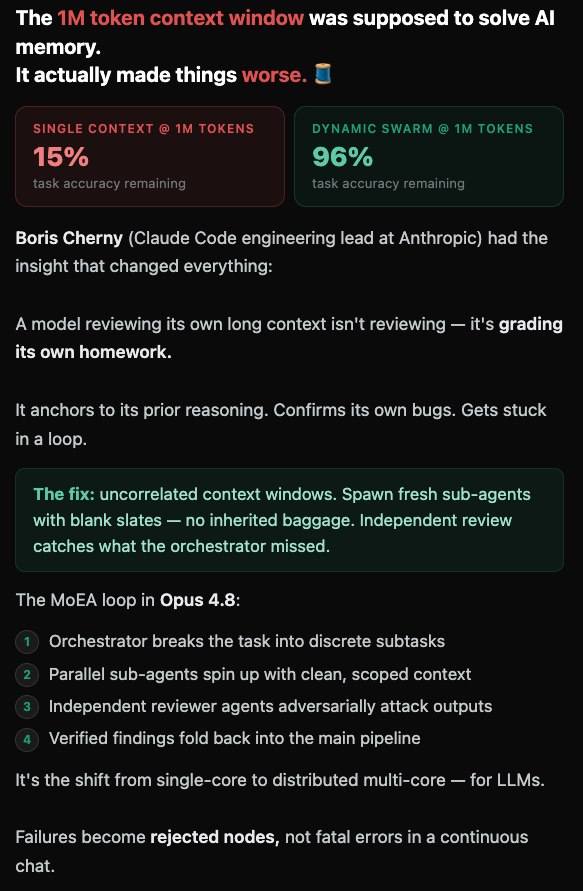
The 1M token context window was supposed to solve AI memory. It actually made things worse. 🧵 Single context @ 1M tokens: 15% task accuracy remaining Dynamic swarm @ 1M tokens: 96% task accuracy remaining @bcherny (@claudeai Code engineering lead at @AnthropicAI ) had the insight that changed everything: A model reviewing its own long context isn't reviewing — it's grading its own homework. It anchors to its prior reasoning. Confirms its own bugs. Gets stuck in a loop. The fix: uncorrelated context windows. Spawn fresh sub-agents with blank slates — no inherited baggage. Independent review catches what the orchestrator missed. The MoEA loop in Opus 4.8: Orchestrator breaks the task into discrete subtasks 1️⃣ Parallel sub-agents spin up with clean, scoped context 2️⃣ Independent reviewer agents adversarially attack outputs 3️⃣ Verified findings fold back into the main pipeline 4️⃣ It's the shift from single-core to distributed multi-core — for LLMs. Failures become rejected nodes, not fatal errors in a continuous chat. Full breakdown data viz → Context Jamming ⬇️ #ClaudeCode#AIAgents#LLM#ContextWindow#Anthropic
5
3
106